

Estimates
The estimate app your client signs on the spot.
Win the job before you leave the driveway. Make an estimate (Jiffy calls it a quote) in a minute, send it while you are still there, and watch your client sign it on their phone. When the work is done, one tap turns it into the invoice.
How to write an estimate on your phone
An estimate in Jiffy is built like an invoice, so there is nothing new to learn.
- Tap New, then Quote, and pick the client or add a new one.
- Add the lines: labour, materials, hours or a fixed price, with your own VAT rate.
- Set how long the estimate is valid, then send it by email, WhatsApp, text or a link.
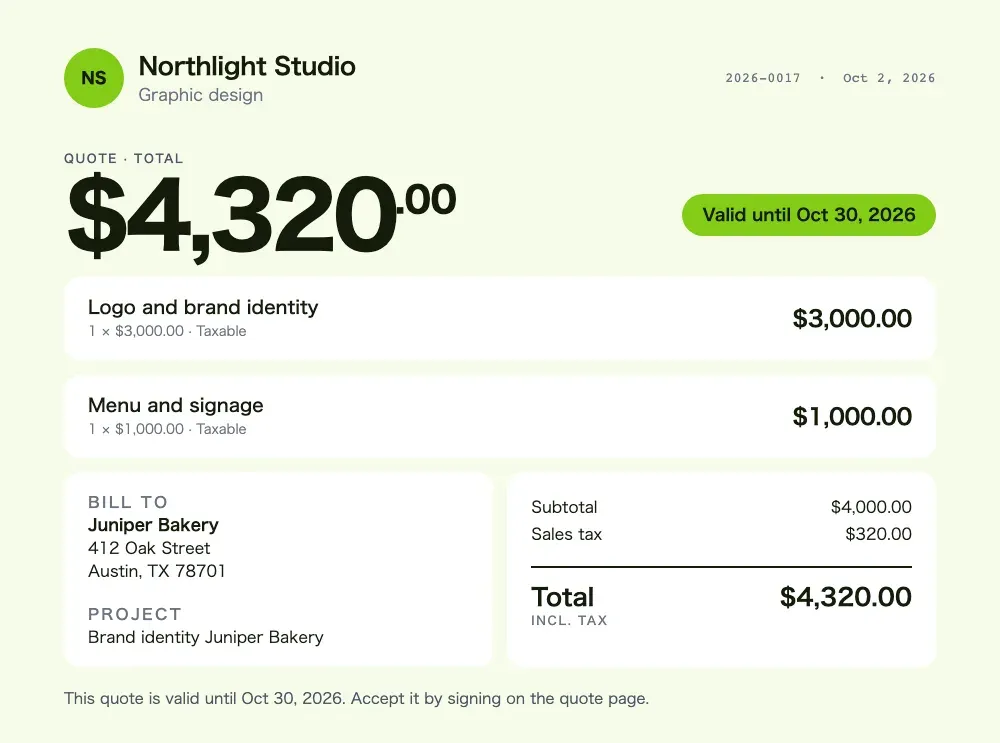
Quote 2026-0017 for Juniper Bakery
£4,800.00
Valid until 30 Oct 2026
Sign to accept
Estimates with e-signature
Your client opens the link, sees the estimate in your template and accepts it by signing on the screen and typing their name. Or they decline, which is an answer too. No account, no app, no printer.
Standing next to the client? Hand them your phone and let them sign right there. You see the signature on the estimate PDF and get a notification the moment it is accepted.
Ask for a deposit when the client says yes
For bigger jobs, add a deposit as a percentage or a fixed amount. Your client sees it before they sign and pays it right after: online by card or Apple Pay on Pro and Ultra, or by bank transfer with your details on the page. Deposits work on every plan.
Convert an estimate to an invoice in one tap
Job done? Open the accepted estimate and tap “To invoice”. Jiffy makes the invoice with the same lines, the same payment schedule and any deposit already paid, so the client only pays what is left. Check it and send it with a payment link.
Know where every estimate stands
Jiffy tells you when a client opens your estimate for the first time and how many days it is still valid. Every estimate shows whether it is sent, accepted, declined or expired. An expired estimate can no longer be signed, so an old price never comes back to bite you.
Short on time? On Ultra you can start an estimate by voice: “Quote for Juniper Bakery.” See voice invoicing.
A free estimate app, or more?
Free includes estimates and e-signatures, with 3 invoices a month and no end date. Pro adds unlimited invoices, card and Apple Pay, automatic reminders and your own logo. Compare the plans in pricing, see every feature, or check how Jiffy compares with Joist and Invoice2go. Curious how fast it really is? Here is our stopwatch test.
Keep reading
More features
FAQ
Good questions.
Does my client need an app to sign an estimate?
No. Your client opens the link in any browser, signs on the screen and types their name. You see the acceptance right away.
What is the difference between an estimate and a quote?
In everyday use they mean the same: a price for the job before you start. Jiffy calls it a quote in the app; you can call it whatever your clients expect.
Can I turn an estimate into an invoice?
Yes. One tap on an accepted estimate makes the invoice with the same lines, payment schedule and any deposit already paid.
Is the estimate app free?
Yes. Free includes estimates and e-signatures with no end date. Pro and Ultra add unlimited invoices, card payments and automatic reminders.
Not here? Email us: [email protected]
Send an estimate. Win the job.
Start free with estimates and e-signatures. Free has no end date.