

Designers
The invoice app for designers whose invoice is part of the work.
Clients judge a designer by everything they send, the invoice included. And design work has its own money problems: the 50% upfront you are too polite to ask for, the third round of revisions nobody priced, the retainer you rebuild by hand every month. Jiffy handles all three, and looks good doing it.
An invoice you actually designed
Templates are a starting point, not a cage. On Pro you open any template you have in the design editor and make it yours.
- Your own accent, text and paper colors, with a warning when the contrast gets too low to read.
- Your choice of fonts for headings, text and figures, from 88 families.
- Your logo, the spacing, the corners, and even the word at the top: Invoice, Bill, Statement.


Pin the scope down before you open Figma
Send the project as a quote, one line per deliverable: the logo, the brand guide, two rounds of revisions. The client signs it on their phone, and that signature is your scope. A third round? That is a new line on a new quote, not an awkward email.
Ask for 50% when they accept: set the deposit as a percentage and the client pays it right after signing. When the project ships, one tap turns the quote into the final invoice with the deposit already taken off. See the estimate app.
Retainers that bill themselves
A monthly retainer is the same invoice twelve times a year. On Ultra, recurring invoices send it on the 1st, or prepare it as a draft so you can add the extra hours of a busy month first.
Working for a studio in Berlin or a startup in Austin? Bill each client in their own currency, and the invoice, emails and payment page reach them in their own language.
Let AI do the boring part
Describe a look (“warmer colors, a serif heading, more room for my logo”) and AI adjusts a template or designs one from scratch, on credits. Only your business name, your design choices and your request go to the model. Running a side project as well? Ultra holds up to 10 companies, each with its own logo, colors and invoices. More in AI tools.
Creative templates
Templates for designers and creatives.
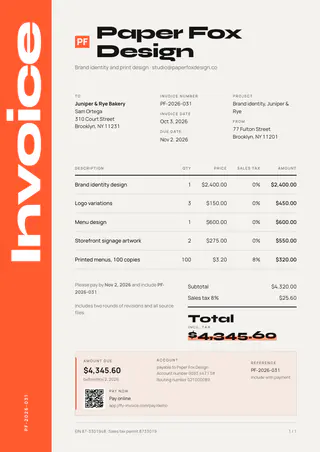
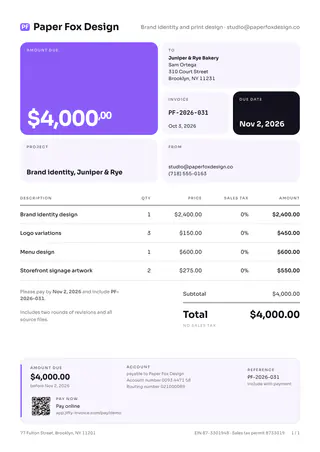
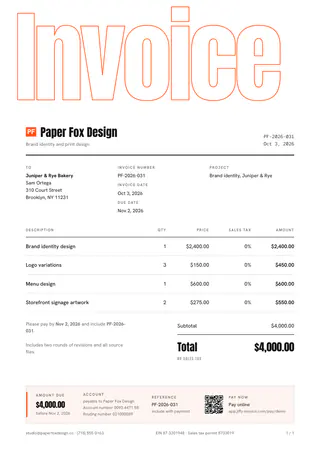
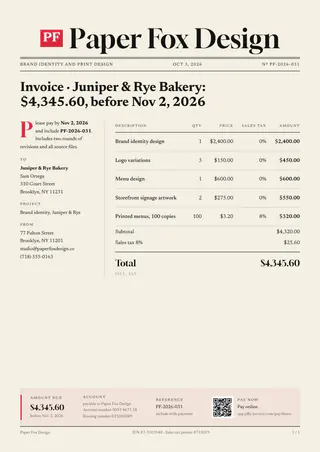
Ten bold templates: an exhibition poster, a Bauhaus composition, a newspaper masthead, a gallery catalogue. Three come with Pro, all ten with Ultra.
The features behind it
Read more about the features
Fill one in
Free invoice templates by trade
Pick your trade for an invoice with the usual lines already in: edit it online and save a PDF, no account.
Other trades
Jiffy for other trades
FAQ
Good questions.
Can I change the fonts and colors of a template?
Yes, on Pro and Ultra. Open a template in the design editor and set your own colors, fonts, logo, spacing and corners. You can keep up to 50 designs.
Can I ask for 50% upfront?
Yes, on every plan. Add a deposit of 50% to the quote. The client pays it right after signing, and it comes off the final invoice.
Can I bill a monthly retainer automatically?
Yes, with recurring invoices on Ultra. Choose the day, and send automatically or get a draft to check first.
Can I invoice clients in other currencies?
Yes. Pick any currency per invoice. Your reports show everything converted back to your own currency.
Not here? Email us: [email protected]
Design the invoice. Then send it.
Start free, then try Pro free for 7 days to make every template your own.